Installation and Setup
Before installation, make sure there are no compilation errors in the console in your project, otherwise you will not be able to see the added package until the existing errors in the project are resolved.
Also make sure there are no other versions of MirraSDK in the project, as they will conflict with each other. You can add the MirraSDK5 package alongside previous versions to migrate your project’s code, but while multiple versions are installed in the project, nothing will work.
If after building the project with MirraSDK5 for WebGL you encounter critical errors such as “SDK is initialized multiple times” or “SDK instance already exists”, make sure you do not have conflicting WebGL native code such as .jslib or .jspre libraries from other plugins that directly interact with the WebGL platform API.
To add the package to the project, open Unity Package Manager and add the package using Add package from git URL..., using the official .git repository address for MirraSDK5:
https://github.com/MirraSDK/SDK5.git
After the compiler processes the new package and Unity no longer shows processing of new code and files in the project, open MirraSDK Toolkit using the Unity window context menu.
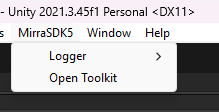
MirraSDK Toolkit is needed to configure MirraSDK behavior for specific configurations. For example, there is a MirraWebConfiguration — it is responsible for MirraSDK behavior on WebGL. The modules selected in this configuration will be used when running a WebGL build if you have selected this configuration in the Build Configuration dropdown list.
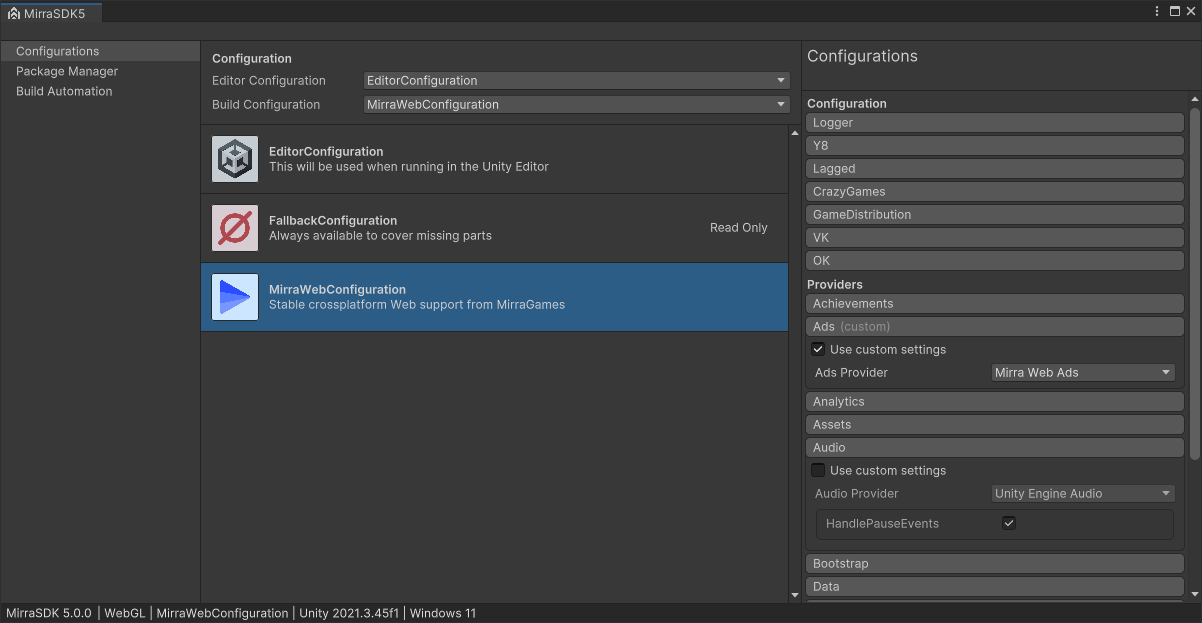
Note that the configurations available to you in MirraSDK Toolkit will appear or disappear depending on which platform you have selected in Build Settings. For example, MirraWebConfiguration will not be available for a Windows or Android project, and GooglePlayConfiguration will not be available for WebGL. Make sure to check which platform you have selected in Build Settings if something is missing, as MirraSDK Toolkit changes depending on the selected build platform.
You can also choose a configuration that will run in the editor during Play Mode, but keep in mind that you cannot call native code from the editor, so configurations that access native code through plugins (e.g., MirraWebConfiguration) will launch with an error in the editor. It is recommended to use EditorConfiguration for the editor as it is selected by default, or FallbackConfiguration to completely disable all MirraSDK5 functionality, since FallbackConfiguration provides empty modules, or in other words, stubs — it does nothing and exists as a fallback in case no other modules are available for use.
Before using the MirraSDK API in your project code, you must wait for MirraSDK to be ready before accessing it through code. Any access to the MirraSDK API before it is ready (initialized) will result in an exception or a critical error, which can cause a crash. It is recommended to create an empty scene and assign it as the first one in Build Settings, implement the MirraSDK initialization wait in it (https://romanlee17.com/en/unity/mirrasdk/initialization), and only then load the next scene where you can access the MirraSDK API as much as you want and whenever you want without restrictions.
You can explore the MirraSDK API in the documentation sections below:
Achievements: https://romanlee17.com/en/unity/mirrasdk/achievements
Ad Monetization: https://romanlee17.com/en/unity/mirrasdk/ads
Analytics: https://romanlee17.com/en/unity/mirrasdk/analytics
Loading Files: https://romanlee17.com/en/unity/mirrasdk/assets
Audio Settings: https://romanlee17.com/en/unity/mirrasdk/audio
Bootstrap: https://romanlee17.com/en/unity/mirrasdk/bootstrap
Saving Progress: https://romanlee17.com/en/unity/mirrasdk/data
Device: https://romanlee17.com/en/unity/mirrasdk/device
Experiments: https://romanlee17.com/en/unity/mirrasdk/flags
Initialization: https://romanlee17.com/en/unity/mirrasdk/initialization
Localization: https://romanlee17.com/en/unity/mirrasdk/language
In-Game Purchases: https://romanlee17.com/en/unity/mirrasdk/payments
Platform: https://romanlee17.com/en/unity/mirrasdk/platform